WordPress agency growth can be as simple as winning a new client, adding a site to your portfolio, and including it on your update schedule. This scales as you gain more clients, but while a handful of sites are manageable, a bigger portfolio means your time and resources become scarce.
This scaling trap means revenue grows alongside the operational load, unless you’ve built automation into the foundation of how your business runs.
In this post, we look at what manual WordPress management actually costs, what automation covers at every layer of your stack, and how your business economics change when routine work no longer depends on a person to execute it.
The real cost of managing WordPress sites manually
Ask an agency owner what managing multiple WordPress sites involves, and they list the visible work. What they often miss is how each of those tasks multiplies across every site in a portfolio per week, and the real monetary cost.
For instance, a typical maintenance week covers the following:
- Plugin and core updates need to be applied across every live and staging environment, then checked for conflicts before they go out.
- Security monitoring requires reviewing alerts, scanning for vulnerabilities, and acting on anything flagged for each site.
- Backup verification means confirming that automated backups have completed and that restore points are usable.
- Cache management involves clearing server, CDN, and edge caches after deployments or content changes so visitors see the right version of a page.
This doesn’t include performance checks (such as tracking load and PHP response times) or client reporting across the entire portfolio, either.
Spending two hours on plugin updates across thirty sites isn’t generating revenue or moving a client forward. Instead, the time carries an opportunity cost that rarely appears in a project budget, but shows up in how many new clients you can take on (and how fast you can grow).
The problem with manual processes is also consistency. There are many small failures that build up over time: skipped plugin updates, a dirty cache after a deployment, an old PHP version, and many more. Manually managing this introduces risk at every step.
Why hiring more people isn’t the answer
When a team is stretched, the instinct is to hire, which is expensive for a WordPress agency scaling.
Each hire incurs fixed costs (salary, onboarding, tooling, and management time) before they’ve touched a single client site. Hiring also doesn’t change the fact that one developer maintaining 20 sites manually costs the same per site as two developers maintaining forty manually.
Automation doesn’t work that way. A workflow that runs across the same 20 sites costs essentially the same as one that runs across 200. As such, the marginal cost of adding another site to an automated process is close to zero.
Local Leap Marketing grew by 60% without adding technical headcount after moving to Kinsta. This growth isn’t achievable when every new client site requires a human to perform its maintenance.
What WordPress management automation actually covers
Automation in a WordPress agency workflow operates at three levels:
- the hosting infrastructure,
- the platform tooling, and
- custom scripting that connects both to your broader systems.
Each level removes a different category of manual work, and the benefits build when you use all three together.
Infrastructure-level automation through Kinsta
The deepest layer of automation runs entirely below the WordPress dashboard. At Kinsta, every site runs in an isolated Linux container with its own dedicated MySQL instance.
This architecture makes infrastructure automation possible at the per-site level. So you can perform maintenance, restarts, and optimizations without affecting anything else in your portfolio.
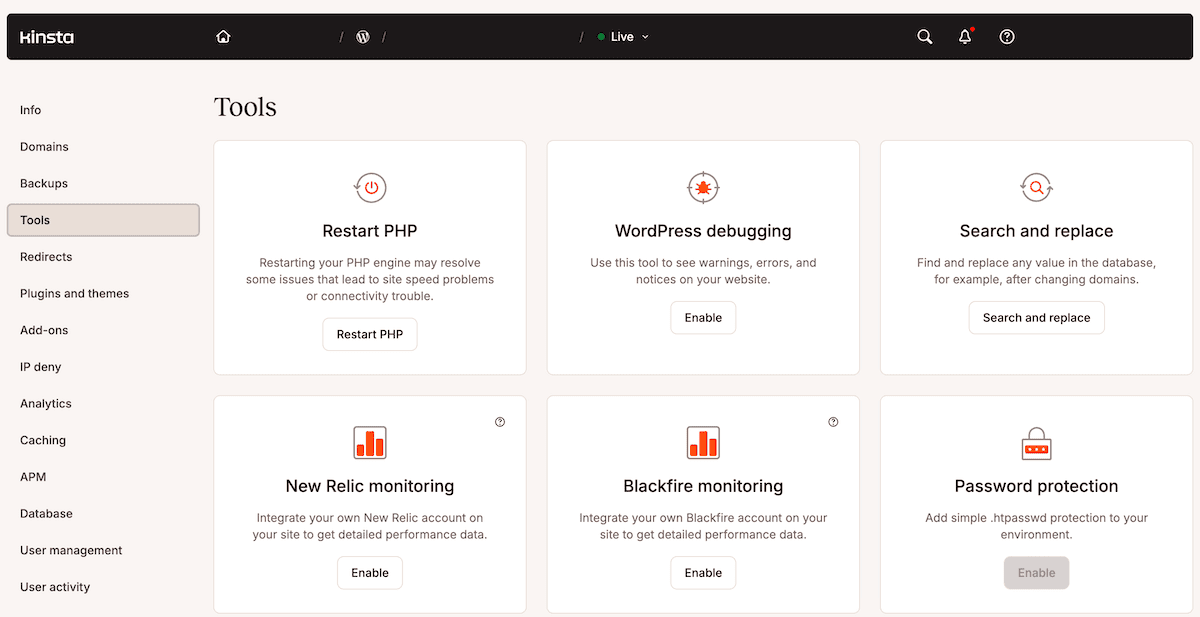
Kinsta has a selection of tools that automatically handle infrastructural tasks for every site on the platform:
- Self-healing PHP monitors your PHP processes and restarts them if it goes down. This means the site recovers without any action from your team and without a client-facing outage.
- Automatic MySQL optimizations run every week to fine-tune database settings based on each site’s specific needs, without touching its contents. If the automated process detects something it can’t resolve, you get a notification.
- Uptime monitoring checks every site on the platform every three minutes. If a monitor fails, Kinsta’s engineers respond regardless of whether you’ve noticed anything.
- Malware scanning and security patching run continuously across the platform, with Cloudflare’s enterprise-level firewall and DDoS protection filtering traffic before it reaches your containers.
These are tasks that would require dedicated time on a self-managed or unmanaged server. At Kinsta, they happen whether you’re watching or not.
For the 400-plus sites within the Straight out digital (Sod) portfolio, this layer of the platform is foundational:
The automated error and vulnerability email alerts provide a layer of security, allowing us to quickly identify and address potential issues, ensuring the ongoingof all the sites we manage.
Bulk operations and site management via MyKinsta
MyKinsta also handles the recurring operational tasks through bulk actioning. This means you won’t need to log into each site individually.
For Adapting Social, consolidating maintenance across over 50 Kinsta sites reduced its weekly maintenance time from 15 hours to under 10 hours. This amounts to more than 250 hours a year, which the team reinvested in client work and new business.
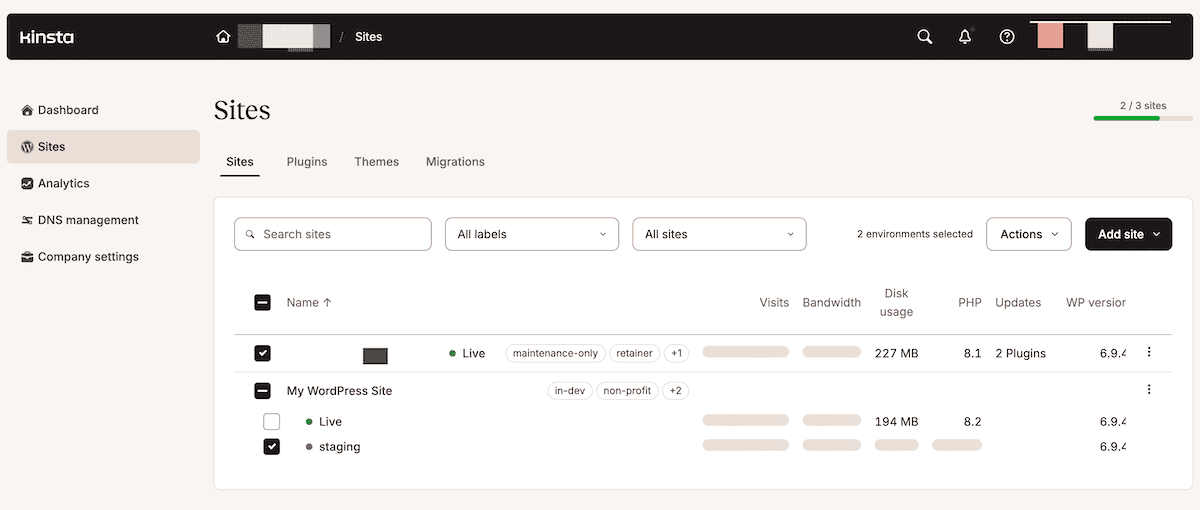
To start a bulk action, go to Sites within MyKinsta, then use the checkboxes on the left-hand side of the sites list to select your target environments. You can select entire sites or individual environments in any combination:
When you’ve made your selection, click Actions above the list to choose a task from the drop-down menu:
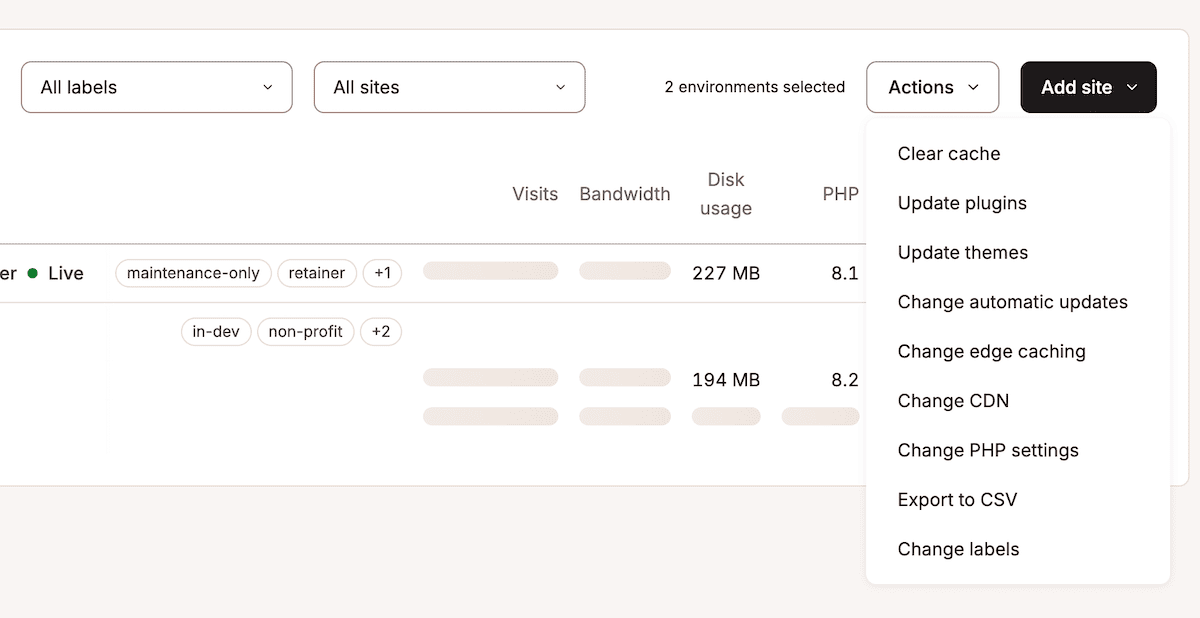
Most of these bulk actions cover the tasks that account for much of your weekly maintenance workflow:
- Clear cache flushes your choice of server, CDN, and edge caches in a single step.
- Update plugins and Update themes both let you select from the available updates across your selected environments, along with a count of how many have each plugin installed.
- Change PHP settings lets you update the PHP version and enable (or disable) automatic PHP updates at once.
There are a few other valuable bulk actions too, such as Export to CSV. This generates a spreadsheet with data for each environment, including the PHP version, bandwidth, disk usage, domains, data center location, and more.
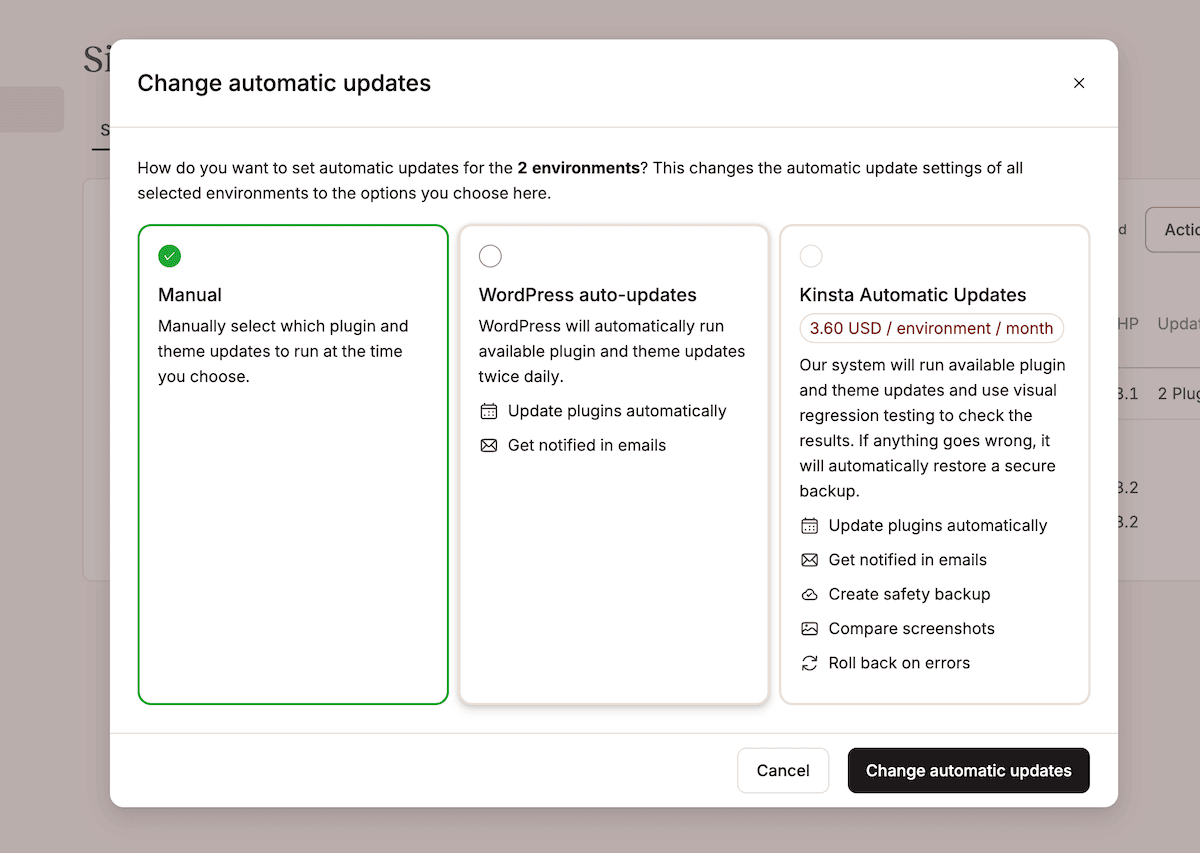
Finally, Change automatic updates enables or disables WordPress core auto-updates. However, you can also choose the premium Kinsta Automatic Updates add-on here. This adds visual regression testing that compares before-and-after screenshots and rolls back automatically if something breaks.
Custom automation with the Kinsta API
The Kinsta API gives you programmatic access to the same actions available in MyKinsta. However, it also lets you integrate those actions into your existing workflows, tooling, and deployment pipelines.
How you integrate the API is only limited by your vision and requirements. Even so, there are some use cases that many agencies set up:
- Site provisioning triggered automatically by a CRM event or client onboarding, so a new environment exists before your team’s first call with the client.
- Cache clearing that’s built into a deployment pipeline and runs without a manual step each time code goes out.
- Backup verification as part of a release workflow, so you can confirm a restore point exists before a major change lands on a live site.
- Staging environment creation and deletion tied to project phases, so environments aren’t left running when they’re no longer needed.
The following function retrieves server logs for a given environment. However, it’s the same interaction pattern you’d use for any operation the API supports:
async function getSiteLogs(environmentId, fileName, lines) {
    const query = new URLSearchParams({
        file_name: fileName || 'error',
        lines: lines || 1000,
    }).toString();

    const resp = await fetch(
        `https://api.kinqsta.com/v2/sites/environments/${environmentId}/logs?${query}`,
        {
            method: 'GET',
            headers: getHeaders,
        }
    );

    const data = await resp.json();
    return data;
}
The API also supports CI/CD integration, so deployments can trigger environment tasks without manual steps. If you have an established deployment workflow already, Kinsta fits into what you’re already doing rather than running as a separate process alongside it.
How automation changes your economics
Once you stop spending time on manual maintenance, you’re free to focus on work that generates direct revenue or strengthens client relationships.
For example, Beyond The Brand Media is an e-commerce WordPress agency that saved the equivalent of two hours per day for each helpdesk employee after switching to Kinsta: it could be an additional full-time employee, except without the salary, onboarding, or management overhead that comes with it.
For you, the recovered time goes back into work that grows your business:
- When developers aren’t tied up pushing updates, they can get involved with client strategy and delivery decisions.
- New business development becomes possible because growth doesn’t immediately require a proportional increase in costs.
- You can reassess retainer pricing once the maintenance work takes less time. You get the option to either take on more clients at the same price point or deliver greater value per client at the same margin.
The lean team at KnowTechie recovered around 15 hours per month of admin time that had previously been spent troubleshooting hosting issues. The extra time went back into content creation, which is work that directly drives the site’s revenue model.
What growth looks like for your agency when using automation
However, the argument that cheaper hosting and a bigger team achieve the same outcome doesn’t hold up. Hosting that requires manual intervention to operate is more expensive than a quality option.
Kinsta’s agency hosting plans let you reduce those costs for each site in your portfolio. Agencies that succeed at scale grow by building systems where the cost of adding an extra site decreases as you start to automate repetitive tasks. It’s a different model from the one most agencies start with, and the gap between the two models widens as you grow.
With a Kinsta-backed automation stack, a new client onboarding workflow looks different at every stage. For instance, site provisioning happens through the API, staging environments exist from day one, plugin and theme updates run on a schedule via Kinsta Automatic Updates, and performance and usage data are pulled from MyKinsta analytics without a manual reporting step.
Each of those automations removes a line item from your team’s queue. Together, they change the relationship between your portfolio size and the associated operational cost.
Automation is the foundation of profitable WordPress management
Running a WordPress agency at scale requires systems that can maintain sites without placing disproportionate demands on your team’s time. The work required to keep a growing portfolio updated, secure, and performing doesn’t reduce itself. Instead, it needs you to choose which tasks to automate and which tools to support that automation.
Kinsta gives you infrastructure automation that handles server-level work, bulk actions that compress hours of per-site maintenance into minutes, and an API that integrates your hosting into deployment pipelines. To get the full benefits, map where manual work is concentrated in your current workflow and identify which layer of automation removes it. From there, you know which MyKinsta tool to choose for the job.
If you manage WordPress sites at scale and want to see how the platform is built to support your business, explore Kinsta’s agency hosting plans.