No website gets high traffic immediately after it’s launched. But with quality content, strong performance, and effective search engine optimization, the number of visitors steadily increases. Then, with time, your website attracts thousands of visitors daily — a thrilling validation of your hard work.
But with high traffic comes high stakes.
This traffic could also include sudden spikes, perhaps from a discount announced on your e-commerce store or a viral blog post. The last thing you want is for your site to crash when it’s gaining momentum.
Not everyone knows that where you host your site also plays a key role in ensuring your site loads fast, is reliable, and is secure under heavy loads.
This post explores the essential factors you need to consider to keep your WordPress site performing at its best, even when traffic surges.
What counts as “high traffic” for a WordPress site?
There’s no universal number, but a useful starting point is 50,000 visits per month or consistent periods of high concurrent users.
Past that threshold, most shared and entry-level plans start showing cracks.
Raw visitor counts are also a bit misleading. A WooCommerce store doing 30,000 monthly visits can put more strain on a server than a blog doing 100,000, because every cart interaction, checkout step, and logged-in session generates uncached PHP requests.
Static blog posts can be cached and served almost instantly. Dynamic requests can’t. That gap is where hosting problems start.
If your site runs WooCommerce, a membership plugin, or any feature that generates logged-in or personalized content, you need to think about hosting in terms of concurrent PHP load, not just monthly traffic totals.
Choosing a plan based on today’s average traffic is how you end up scrambling during your first real spike.
Can WordPress handle high traffic?
Yes, but the default setup won’t get you there.
Out of the box, WordPress doesn’t cache pages, doesn’t handle concurrent requests efficiently, and relies heavily on PHP and MySQL for every single page load.
That’s fine at a few hundred visitors a day. At tens of thousands, it becomes a problem.
The platform itself isn’t the bottleneck. The hosting environment usually is. WordPress on the right infrastructure, with full-page caching, a CDN, and enough PHP workers, can handle millions of monthly visitors.
Types of web hosting: Which actually work for high traffic?
Shared hosting is out immediately. You’re splitting server resources with hundreds of other sites, and there’s no graceful way to scale when traffic spikes. It’s fine for a new blog. It’s a liability for anything serious.
Virtual private server (VPS) hosting is a step up, but the ceiling is low and you’re mostly managing it yourself. You can throw more resources at it, but autoscaling isn’t really part of the equation, and performance tuning falls on you.
Dedicated hosting means your website gets an entire server to itself, much like owning a house where you don’t share any facilities with others. However, managing the server requires a high level of technical expertise, as you have full control over the server environment, including the operating system, hardware, and applications.
Cloud hosting uses a network of virtual servers to host your website. Unlike traditional hosting solutions that rely on a single physical server, cloud hosting spreads your website’s data across multiple interconnected servers, often located in different geographical regions.
Managed WordPress hosting takes that further by adding WordPress-specific optimizations on top: smart caching, CDN integration, PHP tuning, and a support team that understands the platform.
Some providers, like Kinsta, even incorporate features from the other types of hosting options listed above, eliminating technical complexities. This ensures that your high-traffic WordPress websites enjoy reliable performance without the hassle of manual management.
So, long story short, managed hosting on cloud infrastructure is the answer here. While it can be more expensive than standard hosting options, the benefits of tailored performance, zero server configuration technicality, security, and support often justify the cost.
Signs your current host can’t handle your traffic
The clearest sign is slow load times that only happen during peak hours.
If your site is fast at 2am and sluggish at noon, you’re sharing server resources with sites that are also getting traffic, and yours is losing the competition for CPU and memory.
After that, watch for 503 and 504 errors. These mean your server ran out of PHP workers to handle incoming requests. Requests queue, then time out.
A site that handles 200 concurrent users fine but breaks at 400 isn’t slow, it’s hitting an architectural ceiling that a plan upgrade on the same infrastructure won’t fix.
TTFB is worth tracking too. Sustained Time to First Byte above 200ms on cached pages, or above 500ms on uncached ones, will hurt your Core Web Vitals scores and, by extension, your rankings.
Most site owners only check speed with a tool like GTmetrix. They’re not separating server response time from total load time, which is where the real problem hides.
The last sign is more subtle: your host keeps suggesting upgrades. A well-designed hosting environment absorbs reasonable traffic growth. If every performance conversation ends with “you should move to our next tier”, the infrastructure probably isn’t scaling, the pricing is.
Key factors to consider when choosing the right web host for high-traffic WordPress sites
Here are the key factors when choosing a web host for your high-traffic WordPress sites.
Performance and speed
Performance and speed are vital for keeping visitors on your site and providing a seamless experience. It’s important to choose hosts with modern server infrastructure, such as SSD storage and advanced caching mechanisms, which significantly enhance loading times.
Additionally, a content delivery network (CDN) can reduce latency by serving your site from multiple data centers around the world, ensuring fast access for users regardless of their location.
The number of PHP threads and the memory limit provided by the host also play crucial roles in the performance of WordPress sites. More PHP threads allow your site to handle multiple simultaneous requests efficiently, reducing loading times during high-traffic periods.
At Kinsta, we offer all these features and more. Our entire infrastructure is built on optimized server environments and Cloudflare, setting us apart from traditional shared, VPS, or dedicated hosting.
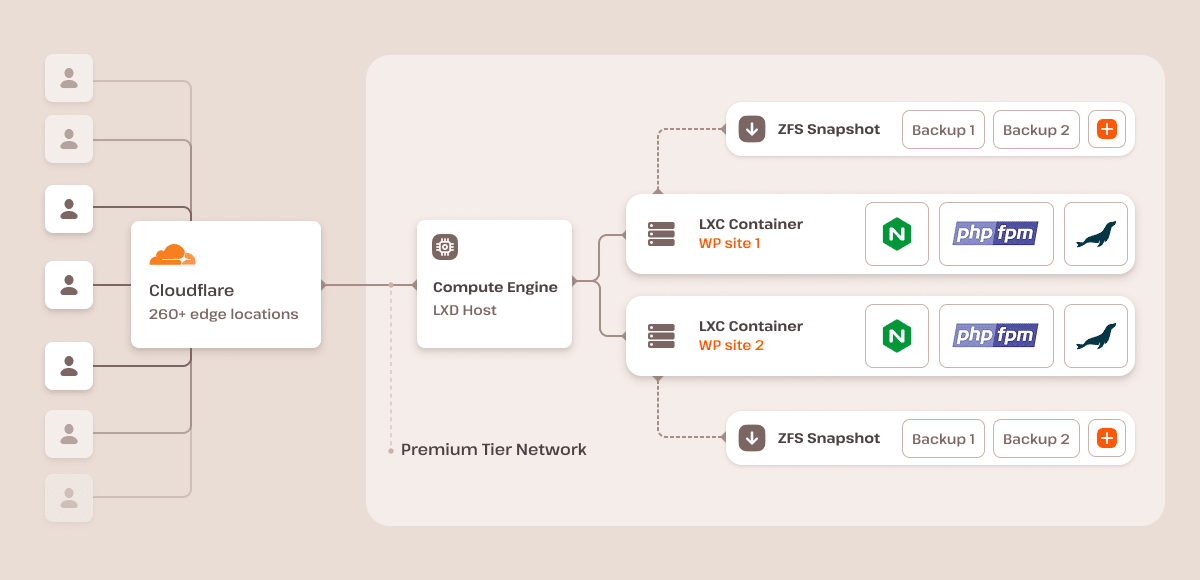
We offer advanced caching options, including edge caching, server caching, and Redis, along with a free CDN powered by Cloudflare’s global network, which includes nearly 200 cities in more than 100 countries. This extensive network ensures lightning-fast server requests, no matter where your visitors are located.
Network capacity and bandwidth
High-traffic sites require robust network capacity and bandwidth. Ensure your host provides sufficient bandwidth to handle large data transfer volumes without bottlenecks.
Avoid shared hosting environments where resources are divided among multiple sites, potentially leading to slowdowns and performance issues. Instead, look for hosts that use isolated container technology, ensuring dedicated resources for your site. This isolation improves stability and performance by preventing other sites from impacting your resource allocation.
Every site hosted by Kinsta runs in an isolated software container, which includes all necessary resources (Linux, NGINX, PHP, MySQL). This setup ensures that your site’s performance is not affected by other sites, providing dedicated bandwidth and consistent network performance.
Scalability
Scalability is paramount when running a high-traffic WordPress site. Your web host must handle sudden traffic spikes without crashing or slowing down.
Look for hosting providers that offer flexible resource allocation. This means that the host should provide resources suitable for your current needs, and you should be able to easily upgrade your plan or purchase necessary add-ons as your site grows without experiencing downtimes.
At Kinsta, we allow users to switch between plans without experiencing downtime. We also have an overage notification system that alerts users when they reach 80% to 100% of their resource consumption. If the resource limit is hit, your site will continue to run perfectly, but an overage fee will be charged. This flexible and user-friendly approach ensures your site can handle increased traffic without compromising performance.
Uptime guarantee
Reliability is non-negotiable for high-traffic websites. A web host offering a minimum of 99.9% uptime guarantee is essential. Downtime can lead to the loss of visitors, revenue, and search engine rankings.
Ensure the host provides proactive monitoring and has a quick response time to address potential issues, minimizing any disruptions to your site.
For every site hosted at Kinsta, we monitor the uptime by checking every three minutes. If our monitoring detects that a site isn’t loading, our engineers respond quickly to get service restored. This proactive approach ensures that any downtime is minimized, keeping your site reliable and accessible to visitors at all times. We also provide an SLA-backed 99.9% uptime guarantee.
Security features
Security is a critical concern for high-traffic websites, as they are often targets for attacks. Ensure your host provides free SSL certificates to encrypt data between your server and users, enhancing trust and security.
Look for hosts with built-in firewalls and DDoS protection to safeguard your site from malicious attacks. Regular backups are also crucial. Daily backups with easy restoration processes can save your site in case of data loss or corruption.
All sites on the Kinsta infrastructure are automatically protected by free Cloudflare integration, including a secure firewall, custom rulesets, and DDoS protection. This blocks malicious bots and protects verified domains with free SSL certificates, ensuring encrypted data transfer.
Additionally, we offer multiple site backup options to ensure your data is always safe. We provide daily automatic and manual backups, with an hourly backup option for mission-critical sites.
Support for WordPress
For a seamless experience, consider managed WordPress hosting for high-traffic WordPress sites. These WordPress hosting solutions handle updates, security patches, and optimizations tailored to this CMS.
They should also offer 24/7 support from WordPress experts, which is invaluable. It ensures you get help whenever issues arise without having to dig through forums or rely on general tech support.
Additionally, ease of management is key for running a high-traffic site. Ensure the host offers an intuitive control panel for effortlessly managing your WordPress site.
Kinsta offers managed WordPress hosting with comprehensive support. Our team of WordPress experts is available 24/7/365 to assist you with any issues.
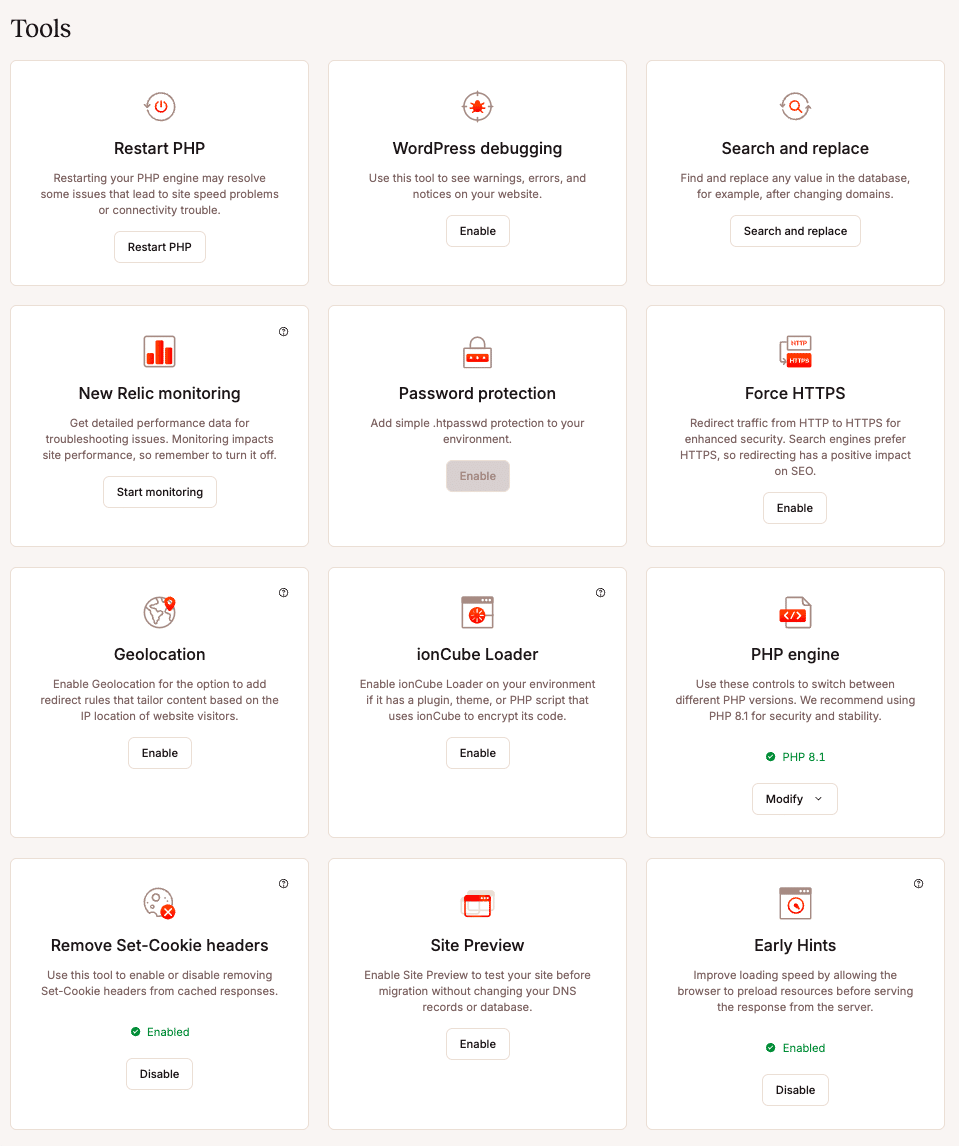
An intuitive MyKinsta dashboard is also provided, which gives you access to hosting features without the need for technical expertise. With MyKinsta, you can easily spin up a WordPress site, view analytics, manage domains, access SFTP/SSH settings, restart PHP, adjust caching settings, and use custom tools for more advanced tasks.
Cost and value
While budgeting for hosting, it’s important to find a plan that balances cost and value. Evaluate the pricing plans to ensure they fit your budget while offering necessary features for high-traffic sites.
Some hosts provide additional features like free migrations, staging environments, and development tools that can add significant value to your hosting package.
Kinsta offers competitive pricing plans that provide excellent value for high-traffic WordPress sites. Our plans include free migrations, a staging environment, and various development tools.
If you mean business and want a high-traffic site without downtime and perfect performance, you will pick a premium host like Kinsta. This choice will save you money and time in the long run by avoiding recurring hosting issues.
Customer reviews and reputation
Lastly, don’t overlook the importance of customer reviews and the host’s reputation. Research feedback from other users to gauge reliability and customer satisfaction.
Hosts with strong reputations in the WordPress community are likely to provide a better experience as they have proven their capability and quality of service over time.
At Kinsta, our clients have a lot to say about our service. For example, Blak Brews shared how they easily handled traffic spikes after winning Gordon Ramsay’s Food Stars with Kinsta. The site managed five hundred simultaneous visitors during the grand finale without issues, providing a seamless user experience.
Similarly, our premium Managed WordPress infrastructure has benefited agencies like Cornershop Creative. With Kinsta, they seamlessly handle over 1.2 million visits across 100+ sites. Initially, Cornershop Creative allowed clients to choose their hosting, but they needed a more reliable solution. After extensive testing, Kinsta emerged as the top choice for its performance, support, and features like full SSH and git access. Now, they host over 110 sites with Kinsta, confidently managing high traffic without downtime.
Performance optimization tips for high-traffic WordPress sites
Once you’ve chosen a hosting provider that meets the key factors outlined above, you can further enhance your WordPress site’s performance with specific optimization techniques.
These tips will help you get the most out of your hosting environment and ensure your site runs smoothly even under heavy traffic:
Optimize images
Optimizing images is crucial for improving the performance of high-traffic WordPress sites. Compression tools like TinyPNG, ShortPixel, and ImageOptim can effectively reduce image file sizes. These tools can be integrated into your workflow to ensure all images are optimized before uploading to your site.
WordPress plugins like Smush, Imagify, and EWWW Image Optimizer can also automatically optimize images upon upload, ensuring that your media library remains efficient. These plugins offer various levels of compression and support modern formats like WebP, helping to maintain a balance between quality and performance.
Lazy loading is another technique that can significantly improve page speed by deferring the loading of images until they are about to enter the viewport.
Using a CDN can further optimize image delivery. A CDN serves images from servers closer to your users, reducing latency and speeding up load times. This geographical distribution of content ensures that users experience faster load times regardless of their location.
Image optimization is even more streamlined for sites hosted on Kinsta. Kinsta’s CDN automatically converts PNG, GIF, and JPEG images to the WebP format, providing superior compression and quality. This automatic conversion ensures that your images load faster, and our clients don’t need to think about image optimization.
Use lightweight themes
Using a lightweight theme is crucial for maintaining fast load times on high-traffic WordPress sites. Lightweight themes have minimal code and fewer features, reducing the amount of data the browser needs to load. Avoid themes with excessive features and bloated code.
Additionally, ensure you regularly update your theme to ensure compatibility and performance improvements, keeping your site running smoothly under heavy traffic.
Minify and combine CSS and JavaScript
Minifying and combining CSS and JavaScript files is essential for optimizing high-traffic WordPress sites. Minification removes unnecessary characters from code, combining multiple files into single ones, reducing file sizes and HTTP requests.
To achieve this, you can use third-party WordPress plugins like Autoptimize, which aggregates, minifies, and caches scripts and styles, making it easy to improve site performance.
Monitor and analyze performance
Regularly monitoring and analyzing your site’s performance is crucial for maintaining optimal speed and reliability, especially for high-traffic WordPress sites.
Tools like Google PageSpeed Insights, GTmetrix, and Pingdom provide detailed reports on your site’s performance, helping you track load times, uptime, and overall site health. These tools offer actionable insights to help you improve your site’s speed and address potential issues before they impact users.
When you host your site with Kinsta, you also enjoy a powerful built-in tool for monitoring performance: the Kinsta APM (Application Performance Monitoring) tool. This tool helps you dig into specific slow page loads to identify the root cause of the issue, making it easier to troubleshoot and resolve performance problems.
Additionally, the MyKinsta dashboard provides built-in analytics to monitor traffic, resource usage, and overall site performance.

This comprehensive monitoring allows you to make data-driven decisions to ensure your site remains fast and reliable, even under heavy traffic conditions.
Summary
Ensuring your high-traffic WordPress site performs optimally requires a strategic approach to hosting and performance optimization.
Focusing on scalability, performance, security, and continuous monitoring can help you maintain a fast, reliable, and secure website. Leveraging tools and features from your hosting provider, such as those offered by Kinsta, can significantly enhance your site’s ability to handle large volumes of traffic efficiently.
To learn more about how Kinsta can help optimize your high-traffic WordPress site, talk to us today. Our experts are ready to assist you in achieving top performance and reliability for your website.